You're Losing $1,000/Year by Not Doing This Before Buying Online
Last week, I almost paid $1,000 for a gaming monitor. Then I did something that took 30 seconds—and found the exact same product for $999 on Amazon while eBay wanted $1,000. A small difference? Sure. But multiply that across every purchase you make online, and you're bleeding money without realizing it.
Here's the uncomfortable truth: online prices change an average of 2.5 times per day. That laptop you're eyeing? It might be $200 cheaper tomorrow. Or $200 more expensive. Without tracking prices before you buy, you're essentially gambling—and the house always wins.
According to Capital One Shopping (2025), the average online shopper overpays by 15-30% simply because they buy at the wrong time. On a $3,000-$4,000 annual online shopping budget, that's $450 to $1,200 lost every single year.
I'm going to show you exactly how to stop this—with screenshots of the free tool I use for every purchase over $50.
Key Takeaways
- Prices change 2.5x daily – Buying without tracking is gambling with your money
- 15-30% average savings – Smart shoppers time purchases using price history
- Takes 30 seconds – Copy URL, paste, done. Get alerts when prices drop
- Compare across stores – Same product, different prices. Always find the lowest
- 100% free – No browser extension, no credit card, works on any device
Why You're Overpaying (And Don't Even Know It)
Let me hit you with some numbers that should make you uncomfortable:
- 72% of consumers are concerned about rising costs (Deloitte 2025)
- Price variations of up to 50% occur within a single week on the same product
- 45% of shoppers actively hunt across different platforms to save money
- $6.41 trillion in global e-commerce sales in 2025—retailers are fighting for every dollar
That last point is key. Retailers constantly adjust prices based on demand, inventory, competitor pricing, and even what day of the week it is. Tuesday through Thursday typically has the lowest prices as stores compete for mid-week shoppers. End of month brings deeper discounts as retailers push to hit quotas.
But here's what really gets me: fake sales. Retailers inflate prices before "discounting" them. That "50% off" Black Friday deal? Often the same price it was two months ago. Without historical data, you'd never know.

The 30-Second Fix I Use for Every Purchase
Before I buy anything over $50 online, I do this:
- Copy the product URL
- Paste it into PriceLix
- Wait 5 seconds for it to track
- Check the price history (or wait for a price drop alert)
That's it. 30 seconds. And it's saved me hundreds of dollars this year alone.
Let me show you exactly how it works with real screenshots.
Step 1: Find Your Product
I wanted to buy an ASUS ROG Swift 32" 4K OLED Gaming Monitor. Found it on Amazon for $999:
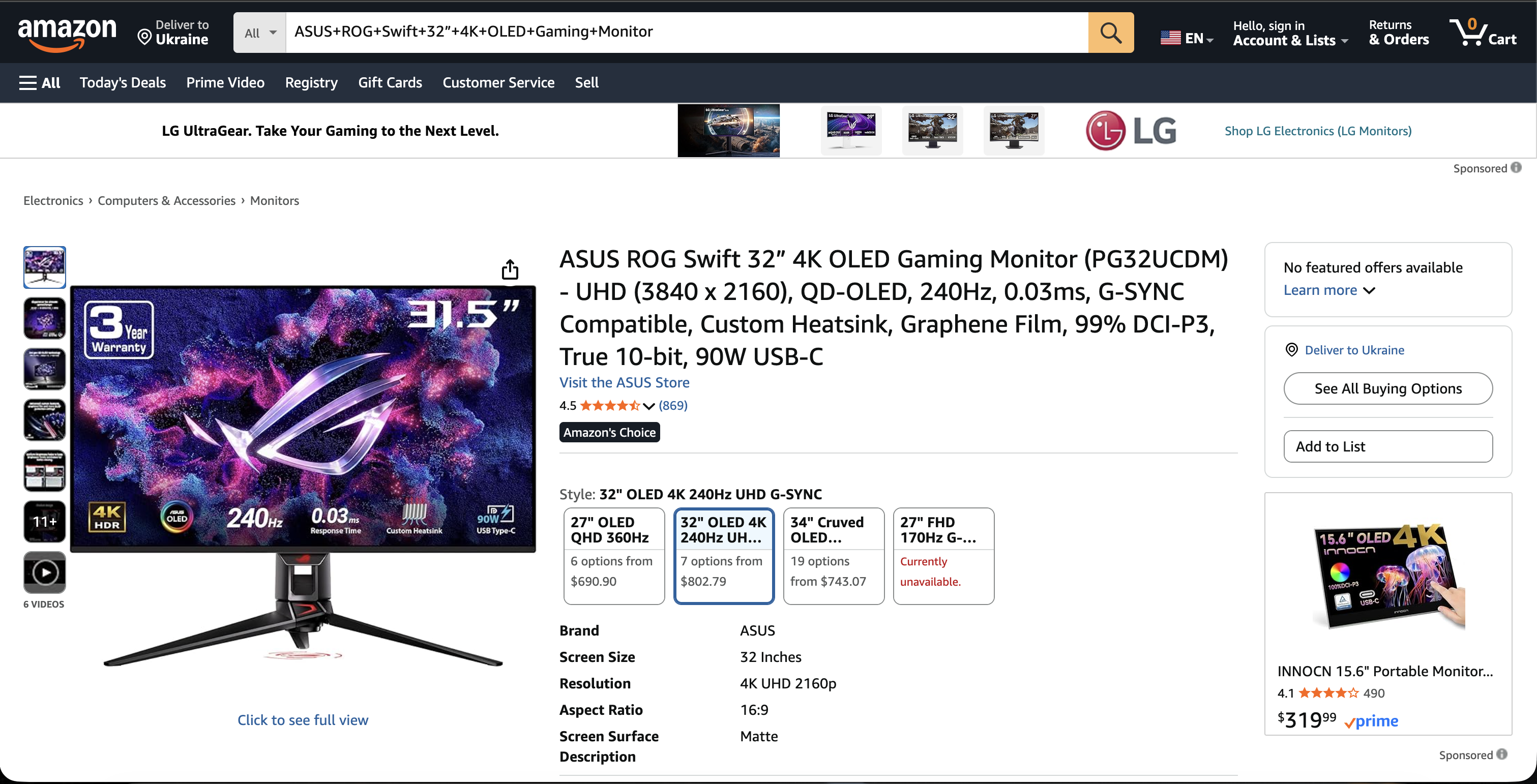
$999 seems reasonable for a premium gaming monitor. But is it the best price? Has it been lower? Is it cheaper elsewhere? I had no idea.
Step 2: Open PriceLix and Add the Item
I went to my PriceLix dashboard and clicked "Add Item":
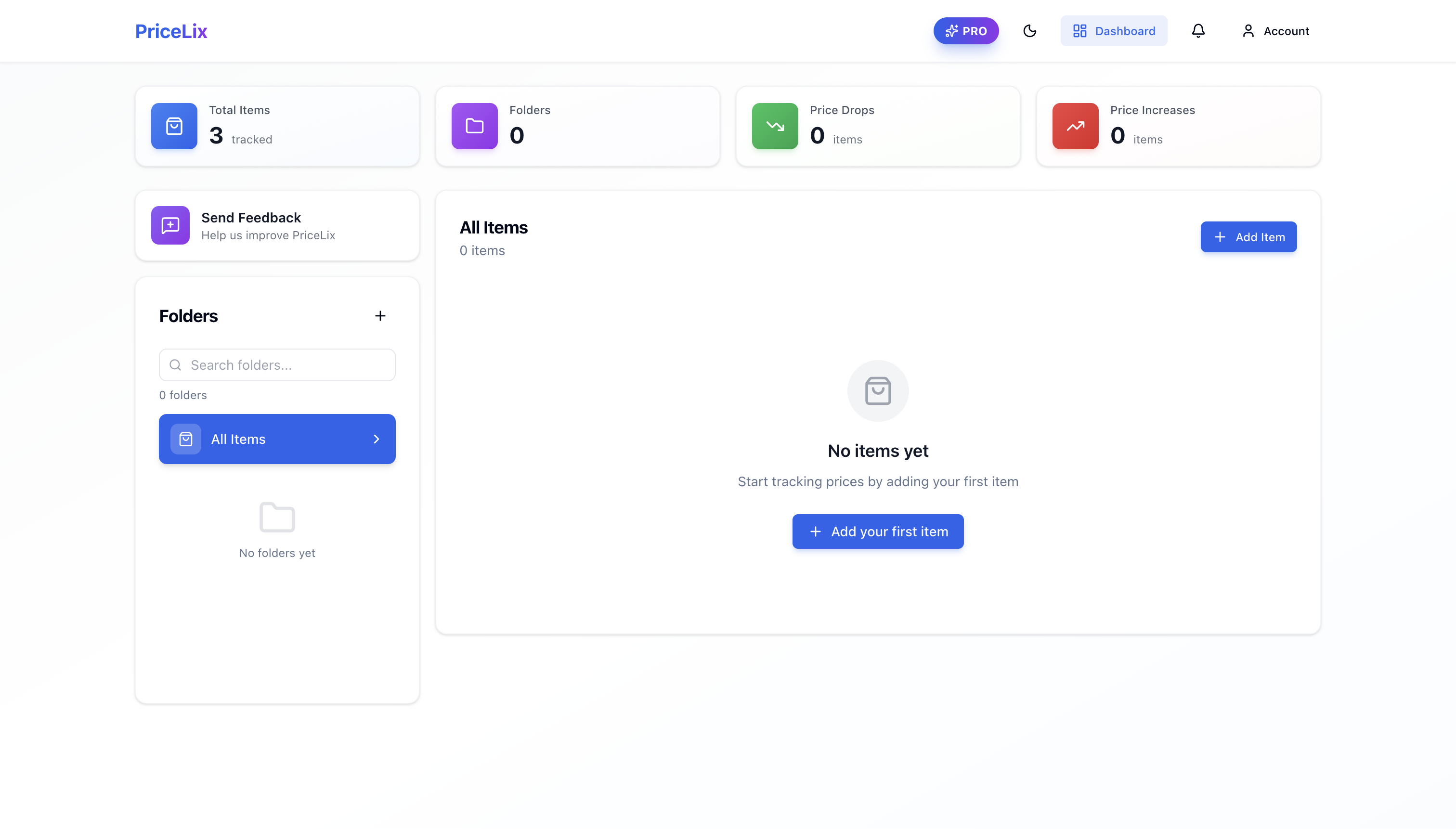
Then I pasted the Amazon URL:
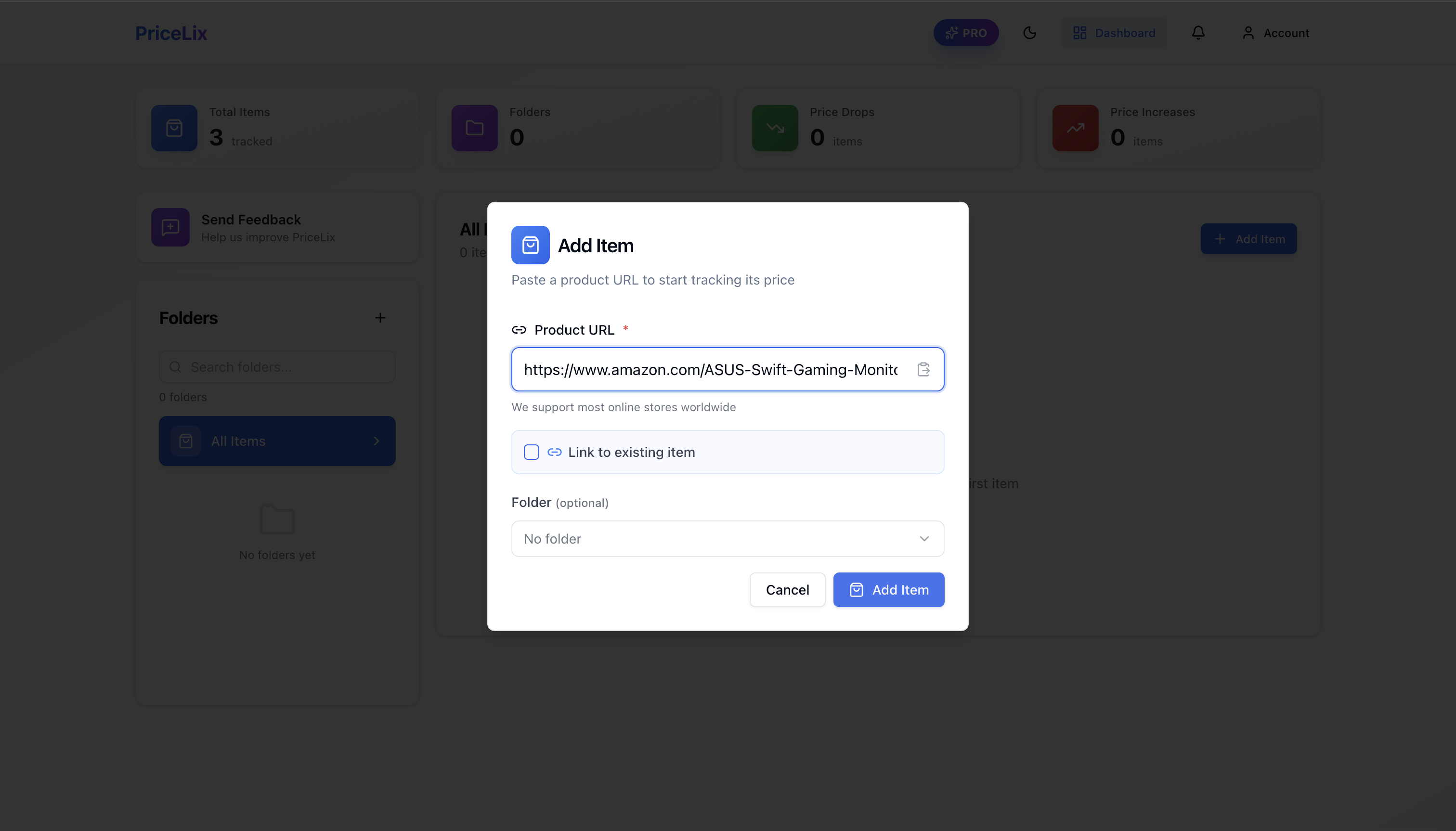
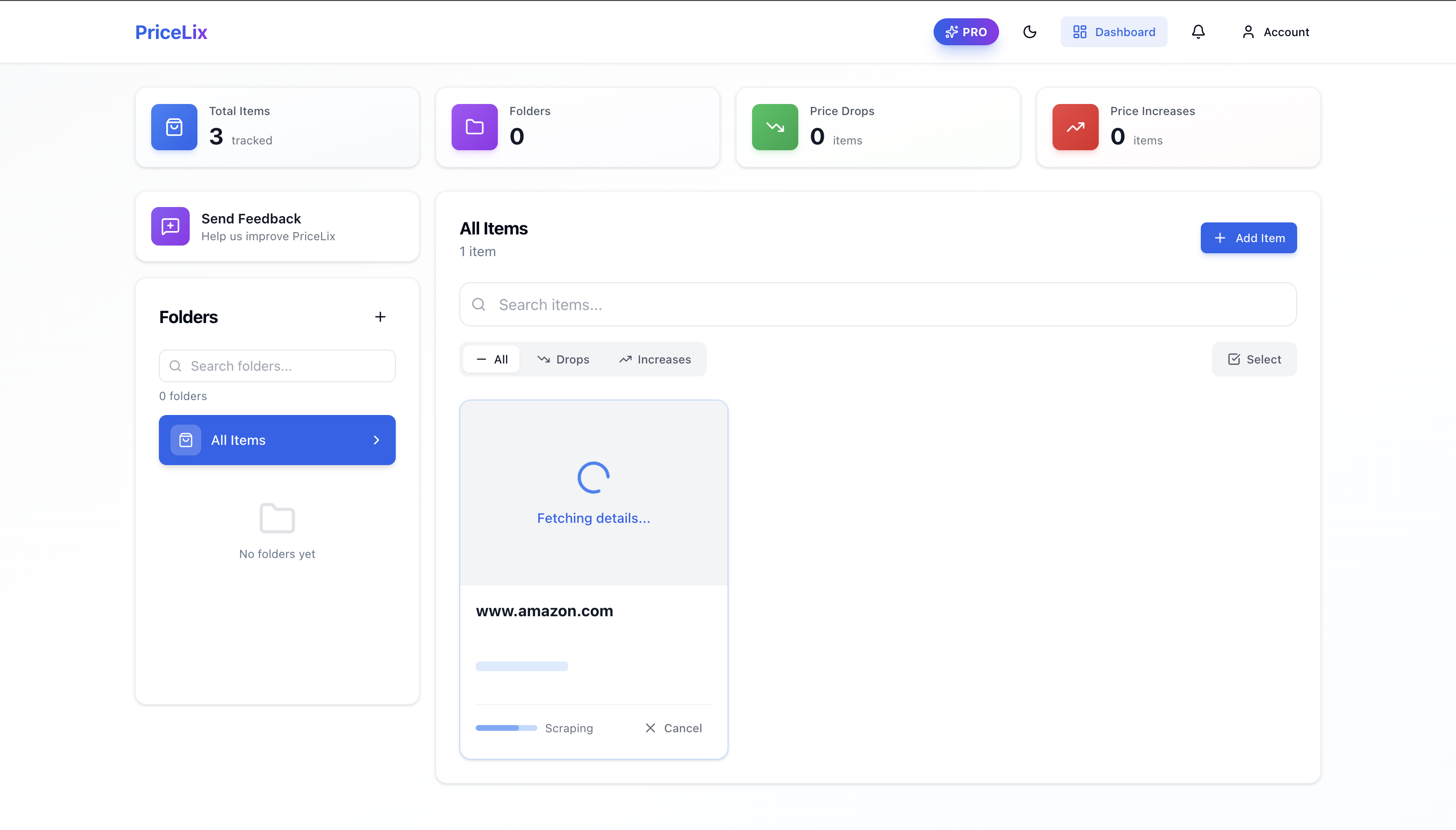
Step 3: Wait 5 Seconds
PriceLix automatically scrapes the product info—name, price, image, everything:
Step 4: Done. Now You're Tracking.
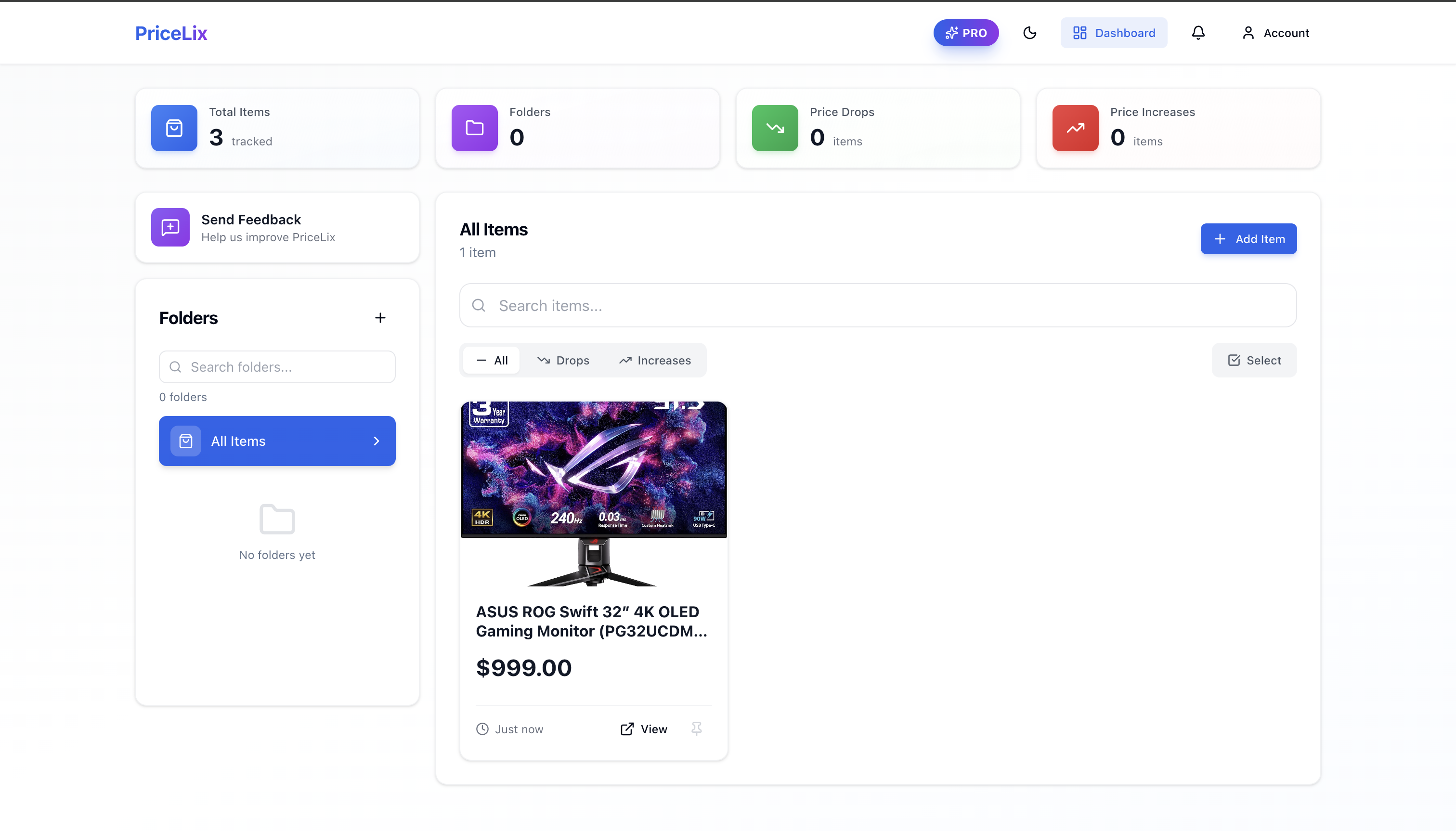
From now on, PriceLix checks this price daily. If it drops to $899, $849, or whatever—I get an instant notification via email or Telegram.
Real Example: How I Saved on a $1,000 Monitor
Here's where it gets interesting. I clicked on my tracked item to see the details:
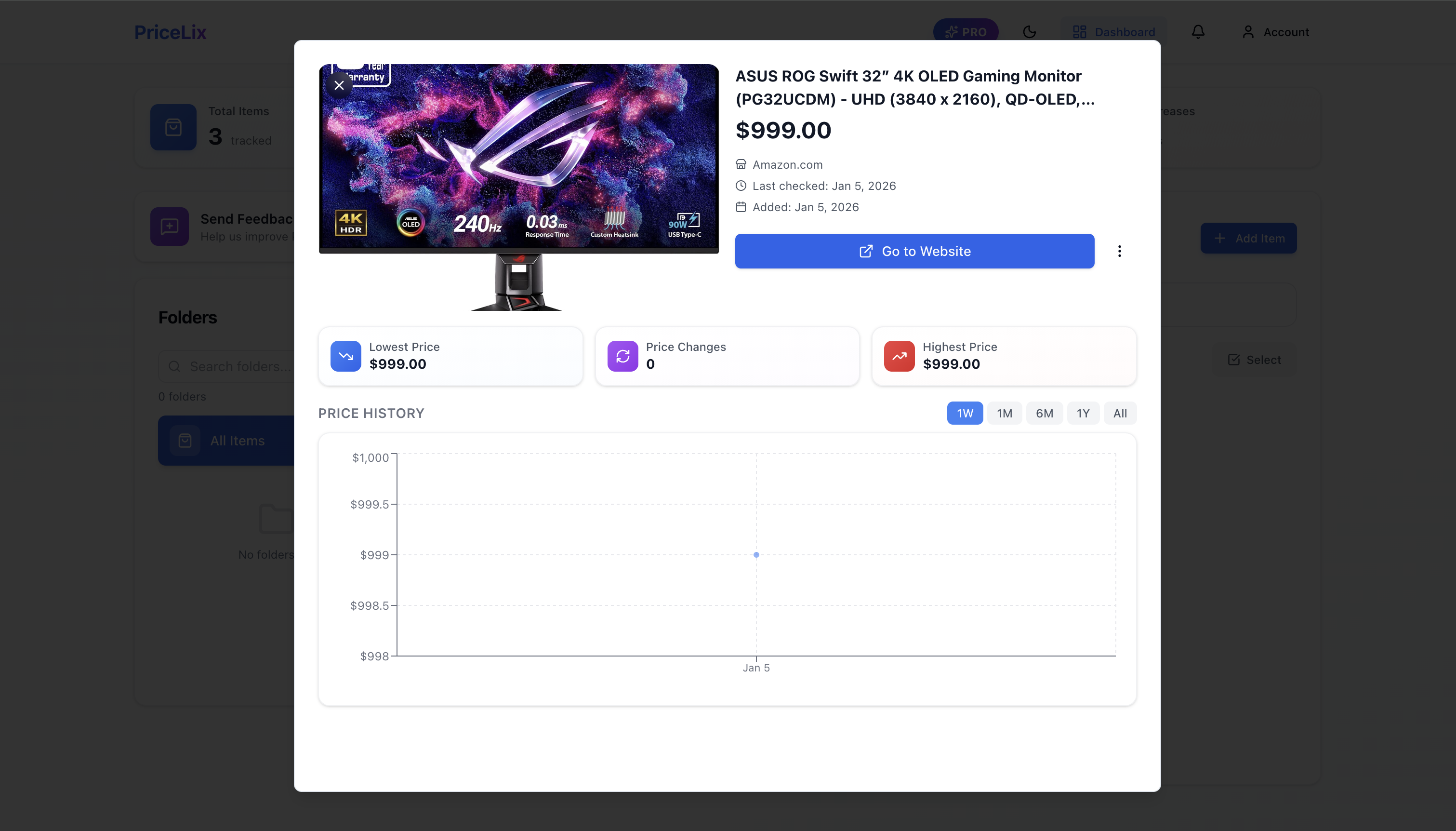
The detail view shows:
- Lowest Price: $999.00
- Highest Price: $999.00
- Price Changes: 0 (just started tracking)
- Price History Chart: Visual timeline of price movements
Since I just started tracking, there's not much history yet. But over time, this chart becomes gold. You'll see exactly when prices spike (avoid buying) and when they dip (buy immediately).
The Secret Feature: Comparing Prices Across Stores
This is the feature that really saves money. I found the exact same monitor on eBay:
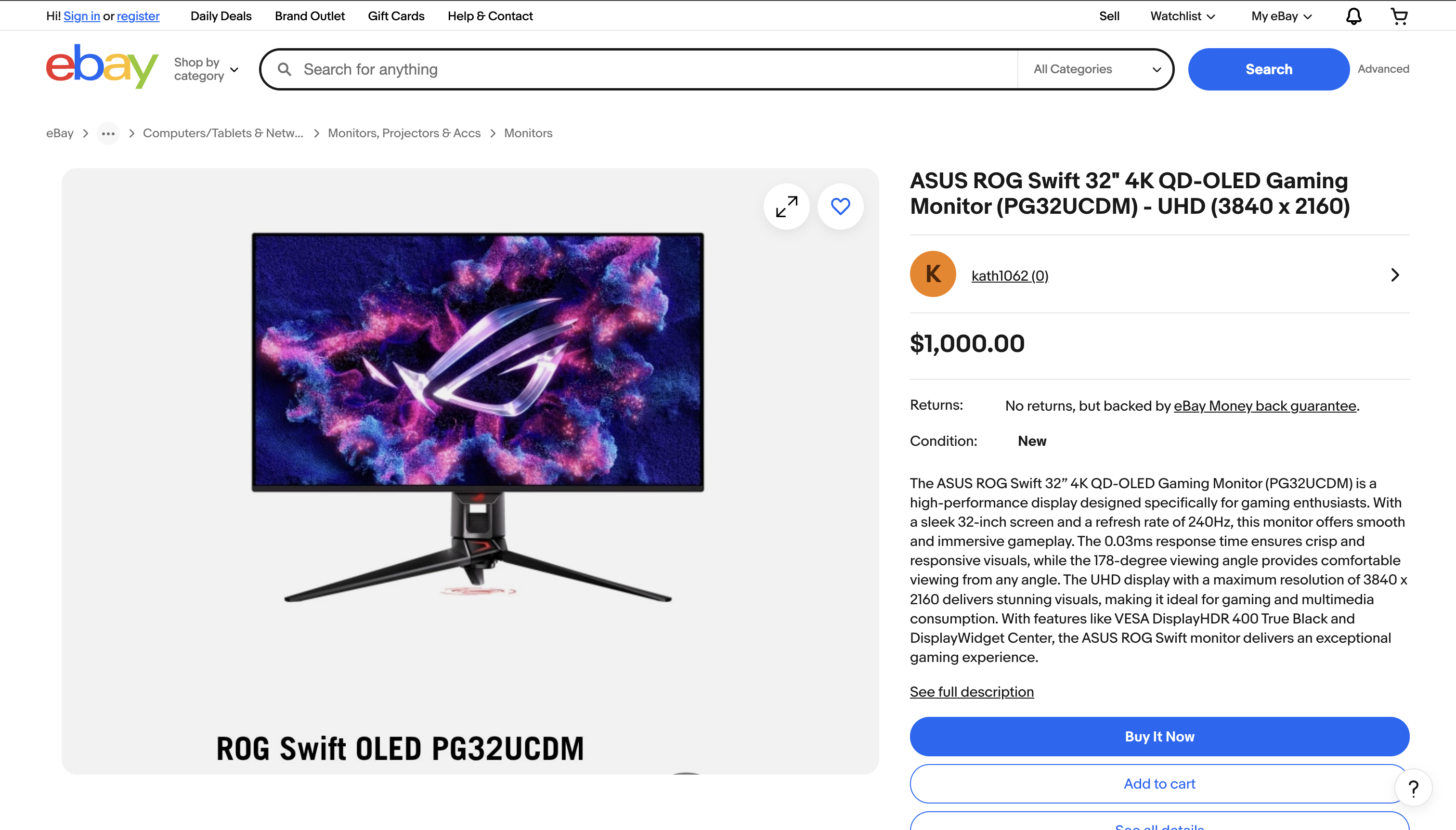
eBay's price: $1,000. That's $1 more than Amazon. Not huge, but what if eBay drops to $899 next week while Amazon stays at $999?
Here's how to track both and automatically find the best deal.
Link Items from Different Stores
When adding the eBay listing, I checked "Link to existing item" and selected my Amazon listing:
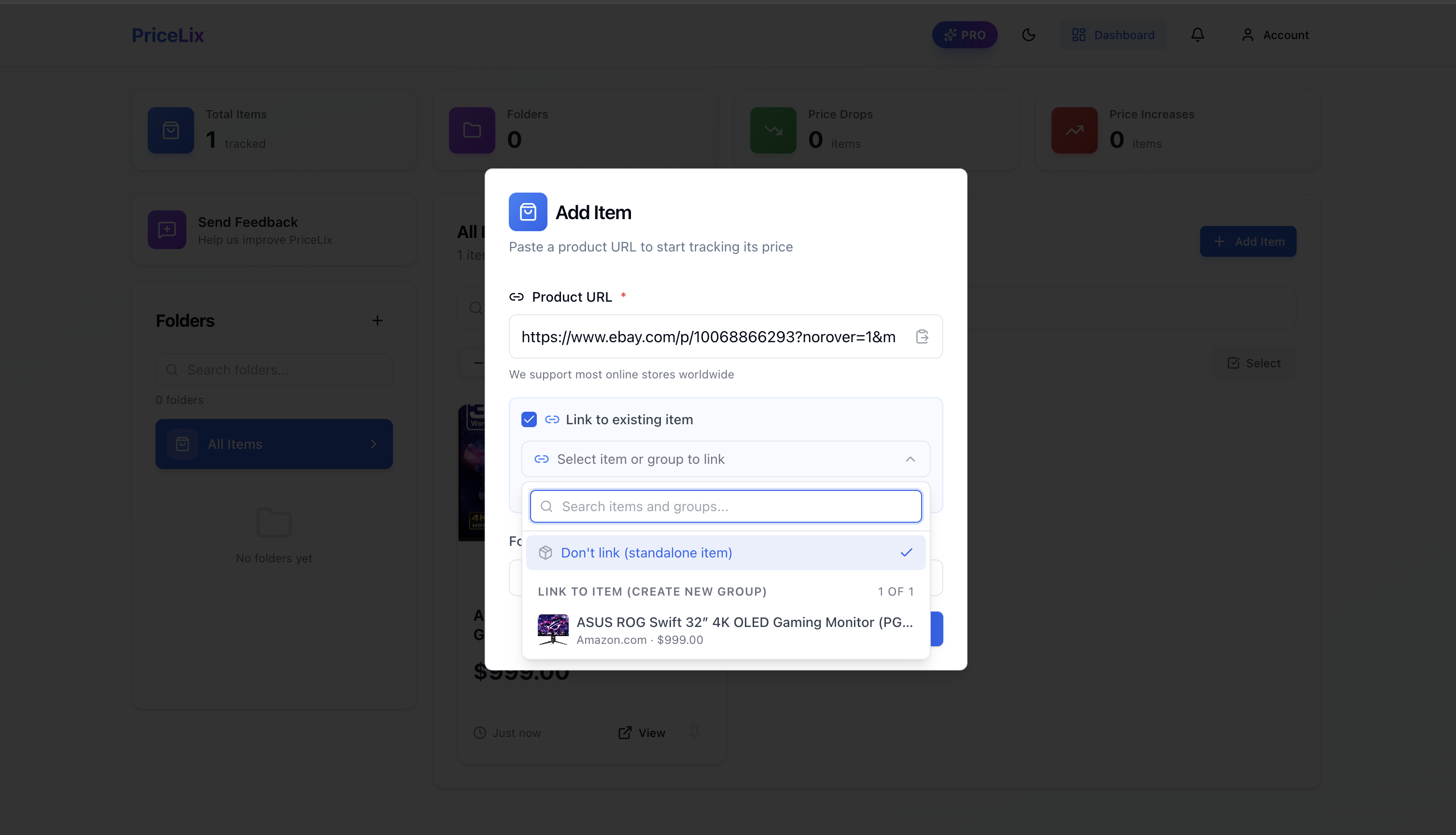
Now both items are grouped as "Linked Items":
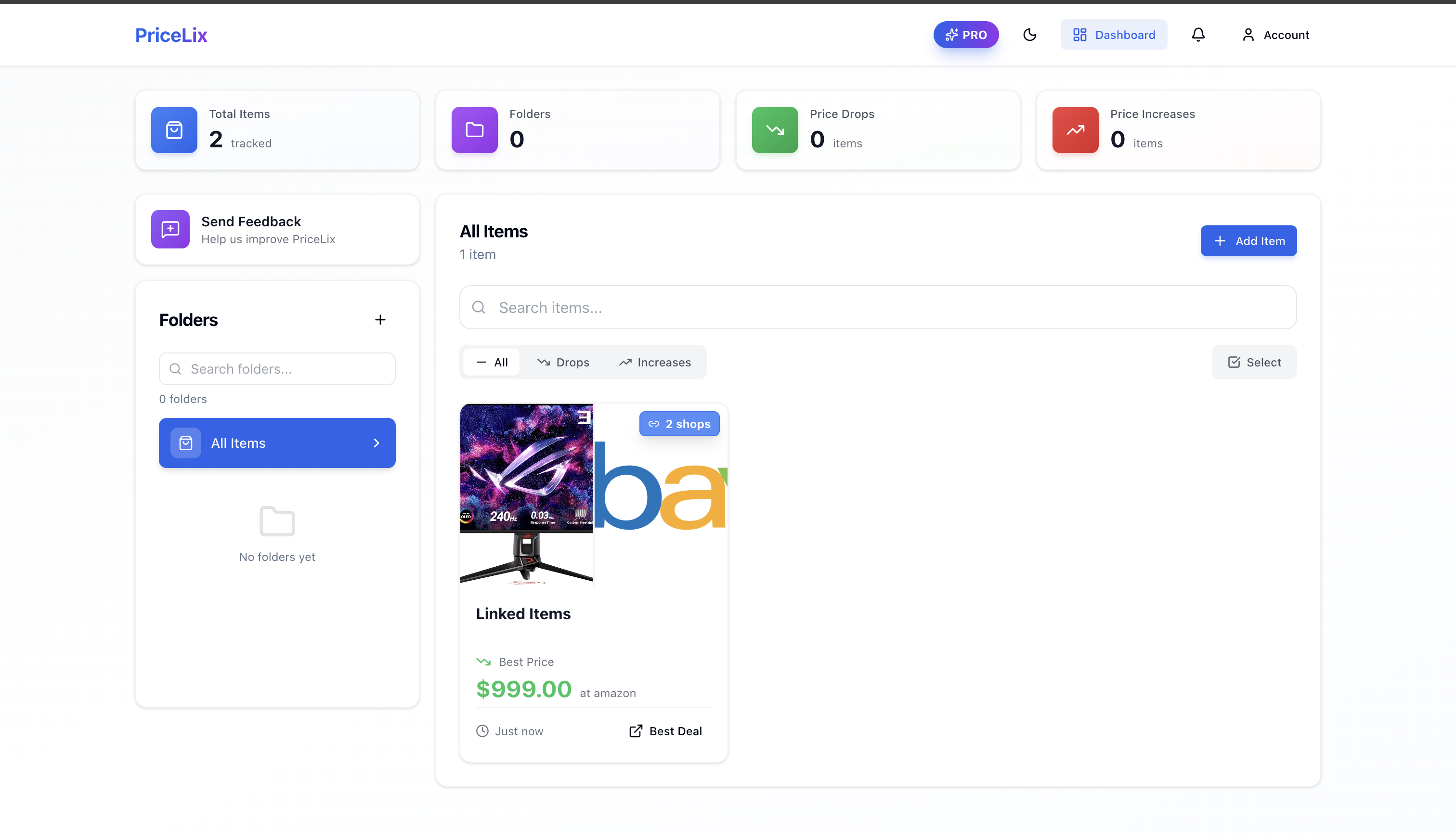
Notice:
- "2 shops" badge – Shows multiple stores are being compared
- "Best Price: $999.00 at amazon" – Instantly know where to buy
- "Best Deal" button – One click to the cheapest option
Full Price Comparison View
Click on the linked items to see the complete breakdown:
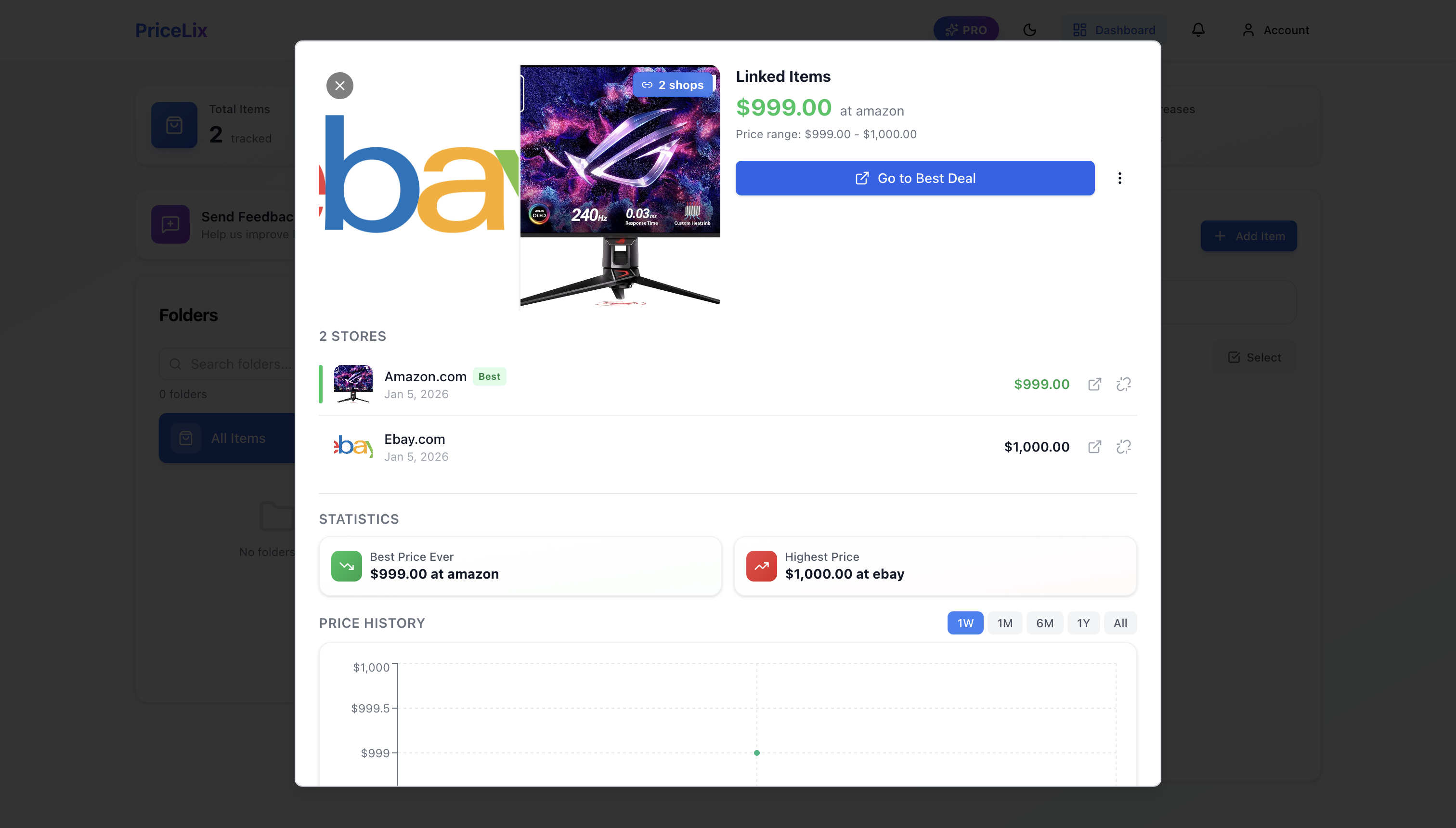
This view is incredible:
- Price range: $999.00 - $1,000.00
- Store breakdown: Amazon at $999 (Best), eBay at $1,000
- Best Price Ever: $999.00 at Amazon
- Highest Price: $1,000.00 at eBay
- Combined price history showing both stores over time
Now I'll get alerts if either store drops their price. The moment eBay hits $950, I know about it. The moment Amazon drops to $899, I'm buying.
For more Amazon-specific tracking strategies, check out our Amazon product price tracker guide.
5 Pro Tips to Maximize Your Savings
1. Track Everything Over $50
The 30 seconds it takes to add an item can save you $10, $50, or $200. Make it a habit. Every time you're about to buy something significant, track it first.
2. Use the 2-Week Rule
Unless it's urgent, track items for at least 2 weeks before buying. This gives you price history context and often catches at least one price drop.
3. Track 3+ Stores for Big Purchases
For anything over $200, track it on at least 3 different retailers. Amazon, Walmart, Best Buy, eBay, manufacturer site—link them all. The price differences will surprise you.
4. Enable Telegram Notifications
Email alerts are fine, but Telegram is instant. For flash sales or limited-time drops, those extra minutes matter. Set up Telegram notifications in your PriceLix account settings.
5. Check Before Black Friday/Prime Day
Start tracking your wishlist items 4-6 weeks before major sales events. You'll have the price history to know if that "60% off" deal is real or manufactured.
Looking for additional savings on specific stores? Check out our JCPenney coupons and promo codes and Macy's promo codes to stack discounts on top of tracked prices.

Frequently Asked Questions
Is $1,000/year in savings realistic?
Yes, if you shop online regularly. The average American spends $5,000+ online annually. Saving 15-30% through price tracking = $750 to $1,500 in savings. Even conservative estimates put it at $500+ per year for active online shoppers.
Which stores does PriceLix work with?
PriceLix tracks prices across 1000+ online stores worldwide—Amazon, eBay, Walmart, Best Buy, Target, Newegg, Home Depot, Wayfair, and hundreds more. If it has a product page with a price, it probably works.
How often are prices checked?
Daily for all tracked items. You receive instant email or Telegram notifications when prices drop. The price history chart updates automatically.
Is it really free?
Yes. PriceLix has a generous free tier with no browser extension required. It works on any device. Premium features exist for power users tracking hundreds of items, but most shoppers never need them.
Do I need to install anything?
No. Unlike browser extensions that slow down your computer and track your browsing, PriceLix is entirely web-based. Just paste URLs and go.
Can I track items from international stores?
Yes. PriceLix supports stores worldwide—Amazon US, UK, DE, and most major international retailers. Prices display in the store's native currency.
Stop Losing Money Today
Every purchase you make without checking price history is money potentially lost. That TV you bought last month? Might have been $150 cheaper the week before. Those headphones? Probably went on sale two days after you bought them.
It doesn't have to be this way.
The next time you're about to click "Buy Now," take 30 seconds:
- Copy the product URL
- Paste it into PriceLix
- Check if it's at a good price—or wait for an alert
That's it. That simple habit is worth $1,000+ per year.
Start tracking prices free with PriceLix—and stop giving retailers your hard-earned money.