
How to build a workflow for tracking discounts
TL;DR:
- Most shoppers rely on one tool, risking missed deals and false savings claims.
- A layered workflow combining price history tracking and active coupon surfacing dramatically improves savings accuracy.
You paid full price for that laptop. Three days later, it dropped $120. That stings. And it happens more often than most shoppers realize. Between flash sales, rotating coupon codes, and price spikes designed to make discounts look bigger than they are, the average online shopper is bleeding money without realizing it. The good news? A simple, repeatable workflow changes all of that. This guide walks you through exactly what tools to gather, how to set up your tracking system, and how to verify that you’re actually saving what you think you’re saving.
Table of Contents
- What you need before you start
- Step-by-step workflow for tracking discounts
- Dealing with deal blind spots and limitations
- How to verify your savings and results
- What most shoppers get wrong about discount tracking workflows
- Take your discount tracking to the next level with PriceLix
- Frequently asked questions
Key Takeaways
| Point | Details |
|---|---|
| Gather essential tools | Use price tracking extensions, coupon managers, and organized watchlists to prepare for better savings. |
| Follow a proven workflow | Set up alerts, monitor prices, and verify coupon stacking with a repeatable step-by-step process. |
| Address tool limitations | No tool is perfect—plan for occasional missed deals and verify discounts during major sale periods. |
| Continuously review results | Track your final savings and refine your approach for even more effective discount catching. |
What you need before you start
Now that you see the risks of missed deals, let’s gather the tools you’ll need to stay on top of discount opportunities.
Most shoppers either rely on a single browser extension or just check prices manually. Both approaches leave money on the table. What actually works is layering two types of tools together: price tracking tools that monitor price history and send alerts, and coupon tracking solutions that surface active promo codes. Using both in tandem gives you a much more complete picture.
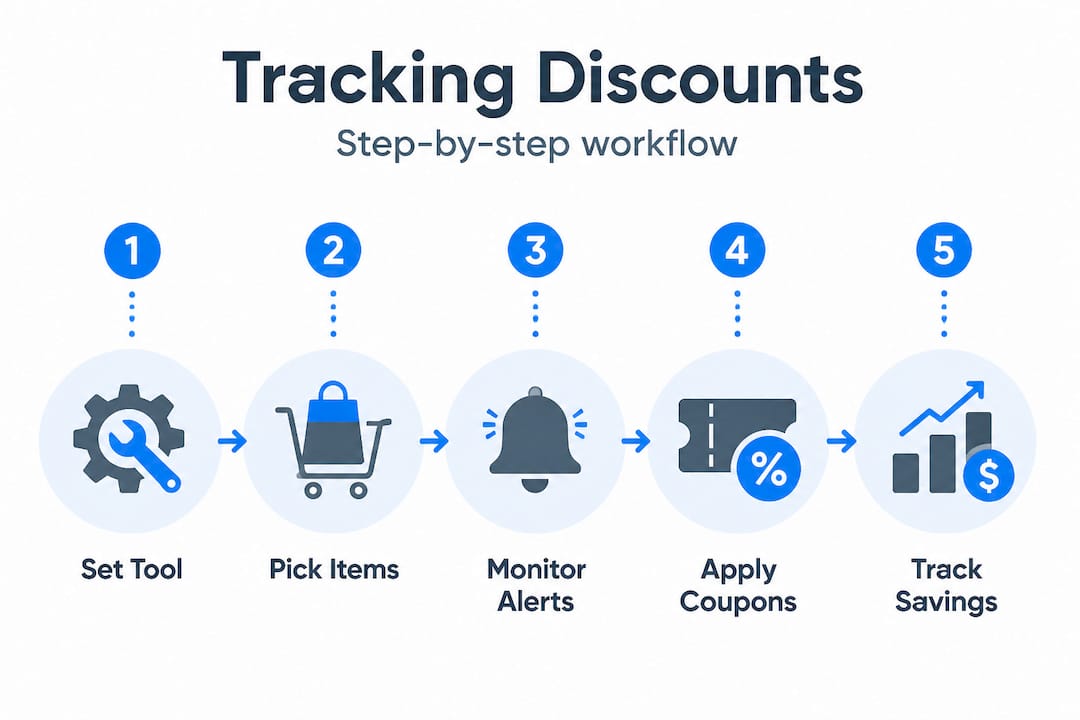
A browser-extension-based approach is commonly recommended for multi-retailer tracking because it integrates directly into your shopping session. But extensions alone aren’t enough. You also need a dedicated price tracking site to catch drops you might miss while you’re not actively browsing.
Here’s a breakdown of the main tool categories you’ll want to set up:
| Tool category | What it does | Examples |
|---|---|---|
| Price tracking sites | Monitor price history, send drop alerts | PriceLix, camelcamelcamel |
| Browser extensions | Surface coupons and compare prices in real time | Honey, Capital One Shopping |
| Coupon managers | Organize and apply promo codes at checkout | Honey Droplist, browser-saved codes |
| Password/login managers | Keep retailer accounts organized | Bitwarden, 1Password |
Before you do anything else, set up accounts on at least one price tracking site and one coupon extension. Then sync your watchlists across both. This is the foundation of any solid best price tracking strategies approach.
Here’s your pre-launch checklist:
- Create accounts on two or more price tracking platforms
- Install a browser extension that auto-applies coupons at checkout
- Set up a dedicated email folder or label for price drop alerts
- Build a shared watchlist or spreadsheet to track items across retailers
- Enable notifications on your phone or desktop for high-priority items
- Organize login credentials so you can quickly access retailer accounts during flash sales
One thing people overlook is the login organization piece. During a limited-time sale, fumbling with passwords costs you minutes. Those minutes can cost you the deal. Get your credentials sorted before the sale starts, not during it. This is part of the broader practice of monitoring discounts in a systematic way rather than reacting in the moment.

Step-by-step workflow for tracking discounts
With your tools ready, here’s a step-by-step process you can follow to systematically catch and act on every discount opportunity.
This workflow is designed to be repeatable. You set it up once per item, and then it runs mostly on autopilot until it’s time to buy.
-
Add items to your watchlist. Go to the product page on Amazon, Walmart, eBay, or wherever you shop. Use your browser extension to add it to your Droplist or equivalent watchlist. Then go to your price tracking site and add the same URL there. Two tracking points are better than one.
-
Set a target price alert. Don’t just track the current price. Set a specific target price you’re willing to pay. Most tools let you enter a number and will only notify you when the price hits that threshold. This keeps your inbox clean and your focus sharp.
-
Review price history before buying. This is the step most shoppers skip, and it’s the most important one. A product listed at “$89, down from $149” sounds great until you check the price history and see it’s been $89 for the past six months. Lifehacker highlights Honey’s Droplist for alerts and multi-retailer comparisons as a solid starting point for this kind of review.
-
Cross-check across retailers. Once you get an alert, don’t just buy immediately. Open your price tracking site and compare the deal across at least two or three retailers. A 15% drop at one store might be a 30% drop at another for the same item.
-
Stack coupon codes before checkout. Before you finalize your purchase, run a quick search for active coupon codes. Your browser extension may auto-apply them, but always double-check. Stacking a coupon on top of a price drop is where the real savings happen.
-
Verify the final price at checkout. Prices can change between the product page and the checkout screen. Always confirm the final number before you click “place order.” This sounds obvious, but it’s a step people rush through.
-
Update your workflow for new platforms. Every time you start shopping on a new retailer, repeat steps 1 through 6. Some platforms have quirks. For example, camelcamelcamel checks regularly but does not catch every Amazon deal type, so you may need a supplementary tool for certain Amazon promotions.
Pro Tip: Set your target price 10 to 15% below the current listed price, not just at the lowest historical price. This gives you a realistic alert that’s still a genuine deal, rather than waiting forever for a price that may never return.
Here’s a quick comparison of two popular tracking approaches:
| Feature | Browser extension only | Extension plus tracking site |
|---|---|---|
| Price history visibility | Limited | Full historical chart |
| Multi-retailer comparison | Partial | Comprehensive |
| Alert customization | Basic | Advanced (target price) |
| Coupon stacking | Yes | Yes, with more control |
| Effort required | Low | Low to medium |
For a more detailed breakdown of how to automate this, check out the automated discount tracking workflow guide. And if you’re new to the whole concept, the monitoring product prices online guide is a great place to build your foundation.
Statistic callout: Shoppers who use price history data before purchasing are significantly less likely to overpay during artificial “sale” pricing events, where retailers temporarily inflate prices before marking them down.
Dealing with deal blind spots and limitations
Even strong workflows have gaps, so here’s how to spot and solve for what price trackers might miss.
No tool catches everything. That’s just the reality. Understanding where your workflow has blind spots is just as important as setting it up in the first place.
Here are the deal types that commonly slip through automated trackers:
- Lightning deals and flash sales. These are time-limited offers that appear and disappear within hours or even minutes. Most price trackers don’t update fast enough to catch them.
- App-only offers. Retailers like Amazon and Walmart sometimes offer lower prices exclusively through their mobile apps. Web-based trackers won’t see these.
- On-page coupons. These are clip-and-apply coupons that appear directly on a product page. camelcamelcamel misses limited-time Lightning deals and on-page coupons entirely, which means you could be leaving real savings on the table without knowing it.
- Bundled discounts. Buy-two-get-one deals or product bundles often aren’t reflected in per-unit price tracking.
- Cashback portals. Sites like Rakuten or TopCashback offer rebates that aren’t visible to price trackers at all.
So what do you do about it? A few strategies help fill these gaps:
- Check the retailer’s app directly for app-only pricing on high-priority purchases
- Visit product pages manually during major sale events like Black Friday or Prime Day to catch on-page coupons
- Use a cashback portal as an additional layer on top of your price tracker and coupon extension
- Set calendar reminders for seasonal sale windows so you’re actively checking, not just waiting for alerts
Pro Tip: During high-traffic sale events, check product pages every few hours rather than relying solely on alerts. The best deals during events like Prime Day often appear and sell out before any tracker can notify you.
“For coupons, keep tracking as a separate but linked layer, then stack codes at checkout.” This approach means treating coupon hunting as its own mini-workflow rather than an afterthought.
The key insight here is that understanding online deals means understanding their mechanics, not just their price tags. And for seasonal events specifically, a dedicated seasonal sale tracking guide can help you prepare well in advance rather than scrambling when the sale goes live.
How to verify your savings and results
Once you’ve started using your workflow, it’s essential to confirm your tactics are really maximizing your savings.
Setting up alerts and buying when prices drop is great. But how do you know you’re actually saving money? A lot of shoppers assume they are, but never check. That’s a mistake.
Here’s a simple four-step verification process:
-
Keep a price log. Every time you make a purchase, record the item name, the price you paid, the tracked lowest price, and the original listed price. A simple spreadsheet works perfectly for this.
-
Screenshot your final checkout. Before you close the confirmation page, take a screenshot. This gives you a record of the exact price paid, including any coupons or discounts applied. It takes five seconds and saves a lot of confusion later.
-
Compare against your tracking data. After a few weeks, go back and compare what you actually paid against the price history charts. Did you buy near the historical low? Did a coupon stack correctly? This is where you learn what’s working.
-
Schedule a monthly workflow review. Set aside 15 minutes once a month to look at your recent purchases, check for missed deals, and update your watchlists. Remove items you’ve already bought. Add new items you’re considering. Event-driven integrations help monitor and stack real-time coupons at checkout, and reviewing these regularly ensures you’re using them to their full potential.
Here’s a sample tracking log format you can copy:
| Item | Price paid | Tracked low | Listed price | Coupon used | Savings |
|---|---|---|---|---|---|
| Wireless headphones | $67 | $65 | $99 | 10% code | $32 |
| Coffee maker | $48 | $44 | $79 | None | $31 |
| Running shoes | $72 | $70 | $110 | 15% code | $38 |
Looking at a table like this over time tells you a lot. You can see where you came close to the tracked low and where you missed it. You can see which coupon sources are actually delivering codes that work. And you can see your real savings, not just the retailer’s claimed discount.
For more tactics on reviewing and refining your approach, the bargain hunting strategies guide covers a range of methods that pair well with a verification-focused mindset.
What most shoppers get wrong about discount tracking workflows
Here’s the uncomfortable truth: most people set up a price alert, forget about it, and call themselves savvy shoppers. They’re not. They’ve just outsourced their decision-making to a tool and hoped for the best.
The “set it and forget it” mindset is the biggest mistake in discount tracking. Tools are only as good as the person using them. A price alert set at the wrong threshold, or for an item whose price history you never actually reviewed, is basically useless. You’ll either get flooded with irrelevant notifications or miss the deal entirely because your target price was too aggressive.
What actually separates good shoppers from great ones is adaptability. Retailers change their pricing strategies. New competitors enter the market. Seasonal patterns shift. A workflow that worked perfectly last year might leave gaps this year. The master discount tracking guide covers how to stay current with these shifts, and it’s worth revisiting periodically.
There are also 7 effective types of online price tracking that most shoppers never even try. Most people only use one or two. Broadening your approach even slightly can dramatically increase the deals you catch.
The other thing people get wrong is treating high-event periods like any other week. Black Friday, Cyber Monday, Prime Day, and back-to-school season reward extra vigilance. These are the windows where active engagement beats passive waiting every single time. During these periods, check your watchlists daily. Visit product pages manually. Look for on-page coupons. The extra 10 minutes of effort during a major sale event can easily save you $50 to $100 on a single purchase.
Technology is a multiplier, not a replacement. Use it to do the heavy lifting, but stay in the driver’s seat.
Take your discount tracking to the next level with PriceLix
Ready to automate and improve your workflow? Here’s how PriceLix can help you save even more, consistently.
If the workflow above sounds like a lot to manage manually, that’s exactly the problem PriceLix was built to solve. You’ve learned the strategy. Now let the right tool handle the execution.
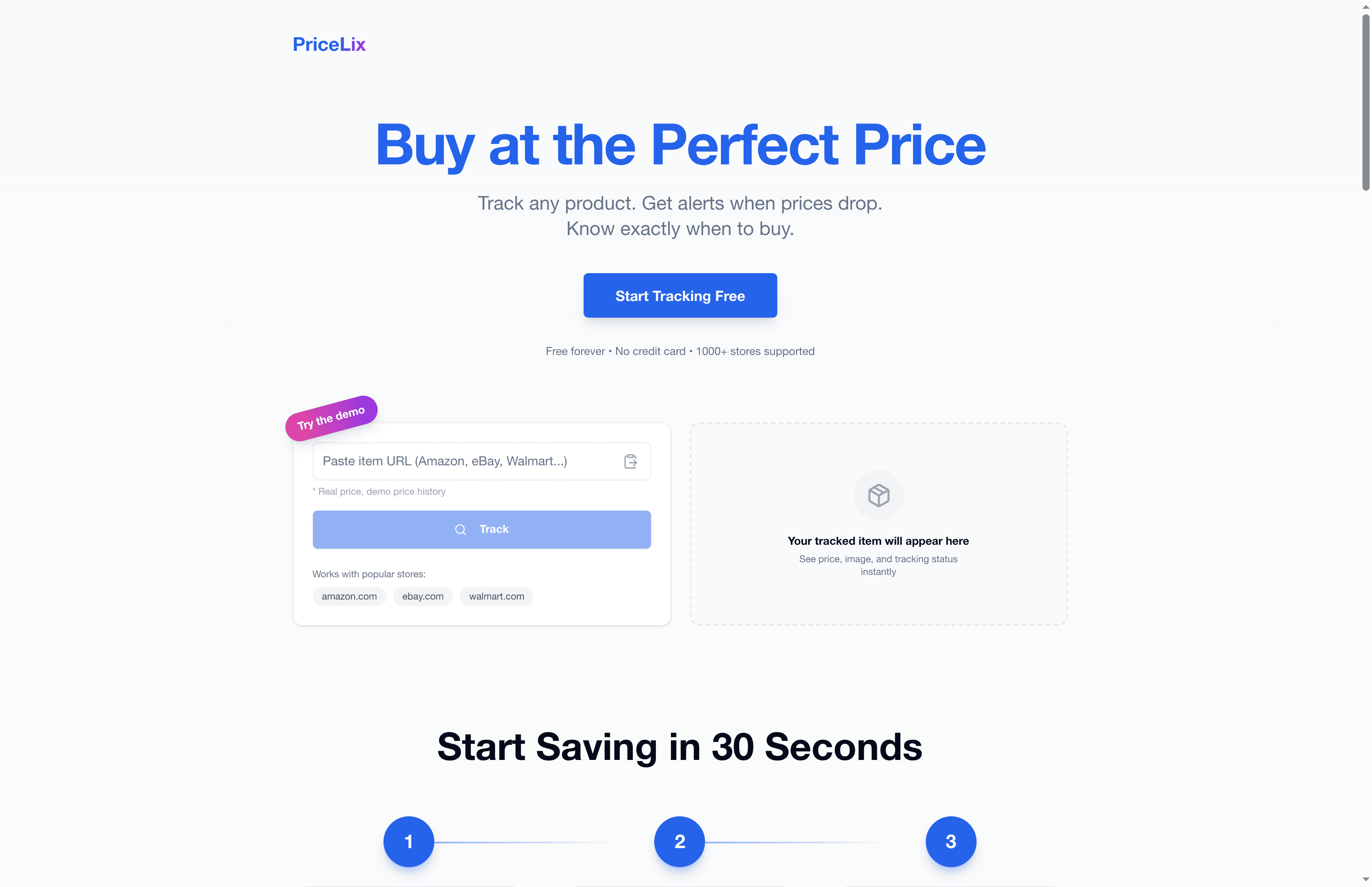
PriceLix brings together everything covered in this guide into a single, clean dashboard. You can track prices across Amazon, eBay, Walmart, and over a thousand other stores, all in one place. Real-time drop alerts notify you the moment a price hits your target. Detailed price history charts let you verify whether a deal is genuine before you buy. And because PriceLix runs daily automated checks, you don’t need to babysit your watchlists. Set your targets, get your alerts, and buy with confidence. It’s the smarter way to shop.
Frequently asked questions
Why do some price trackers miss certain discounts?
Some trackers don’t monitor every type of deal, such as limited-time Lightning deals or on-page coupons. Camelcamelcamel checks regularly but does not catch every Amazon deal type, which is why layering multiple tools is always the safer approach.
How often should I check or update my discount tracking workflow?
Update or review your workflow regularly, especially during high-sale seasons and before big purchases. Higher monitoring frequency helps compensate for blind spots in certain promotional mechanics that automated tools can’t always catch.
What’s the best way to stack coupons with price drops?
Verify coupon codes before checkout and use event-driven coupon tools to combine discounts. Real-time tracking and event-driven integrations make it much easier to stack coupons on top of price drops without missing either opportunity.
Are browser extensions safe for discount tracking?
Most popular browser extensions are safe, but always check reviews and privacy policies before installing. Stick to well-known extensions with large user bases and transparent data practices.
Can I automate the entire workflow across all platforms?
Automation works well for most retailers, but verify savings on rare or very limited deals by checking manually. Automation may not catch every on-page deal or limited-time event, so a quick manual check during major sale periods is always worth the effort.
Recommended
- Automated discount tracking workflow: save more in 2026 | PriceLix
- Master discount tracking to save big in 2026 | PriceLix
- Price Tracking Workflow: Save 20-30% with Automation | PriceLix
- Top strategies for monitoring discounts and maximizing savings | PriceLix
- Why Luxury Discounts Matter for Fashion Shoppers